

DevelopmentFrontendNext.Js
Next JS Data Fetching mistakes & Security vulnerabilities
A guide to Next.js data fetching mistakes & security vulnerabilities
A guide to Next.js data fetching mistakes & security vulnerabilities
Join the conversation by signing in with your Google account

A guide to JavaScript for frontend development for beginners part 1

A guide to routing in Next.js (App Router) covering Catch-All Segments, Dynamic Routes, Nested Routes, and more.

A guide to better frontend development and design principles for beginners part 1
Design & Developed by Ramxcodes
© 2026. All rights reserved.
Fetching data in Next. Js feels pretty straightforward foe the first time.
Just use async await in react server component and good to go.
If user authenticate required await headers, cookies or session as you required.
Here's what flow looks like :
Create an async function, grab some data with Prisma (suppose all the TODO from DB), call it inside your RSC (react server component), and you're done, right?
Unfortunately, NO It's not simple actually. What you have done is created a POST request. Not GET but a POST request because that's how Next. Js works under the hood.
So what's the issue with POST request? The issue is -
Let's start with a common example. I've built a simple todo application where users can create todos that render below a form.
Here's what the typical (but problematic) implementation looks like:
// page.tsx
'use client';

export default function Home() {
  const [todos, setTodos] = useState([]);

  useEffect(() => {
    getTodos().then(setTodos);
  }, []);

  // Rest of component...
}
// actions.ts
'use server';
export async function getTodos() {
const todos = await prisma.todo.findMany();
return todos;
}This works, but it creates several critical problems:
When you use server actions to fetch data, you're creating POST requests instead of GET requests.
I'd say open your browser tab and fetch something using server action and the request will be shown as POST Request.
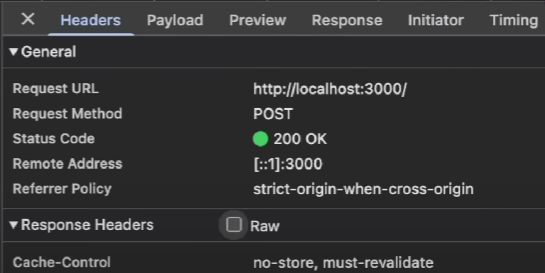
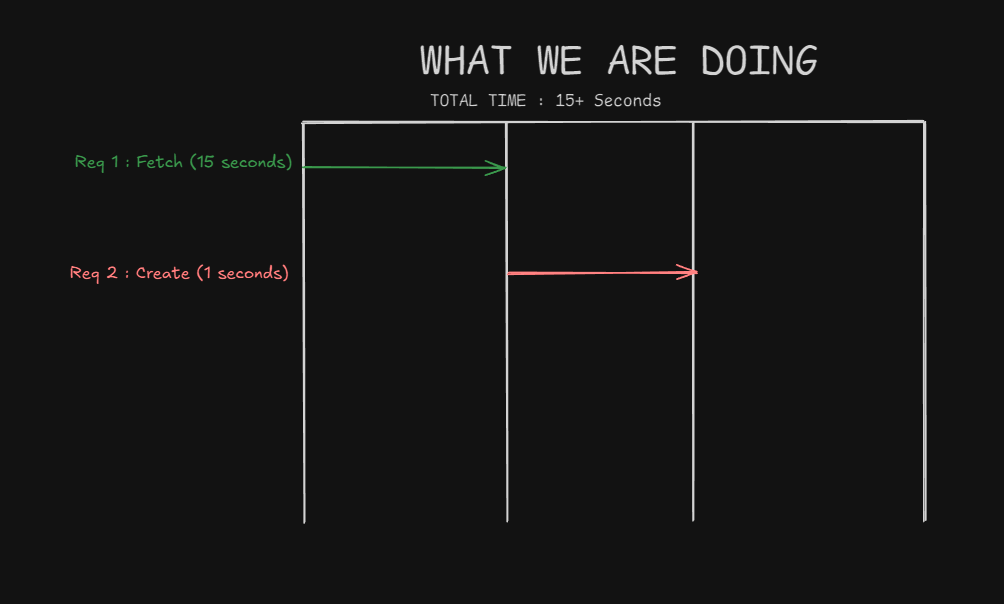
The bigger issue is that POST requests run successively, not in parallel. If I we suppose request takes 15-second for the data fetching function and try to create a new todo while data is loading, the creation request waits for the fetch to complete first. This destroys performance.
Here's what happens:
What we want:
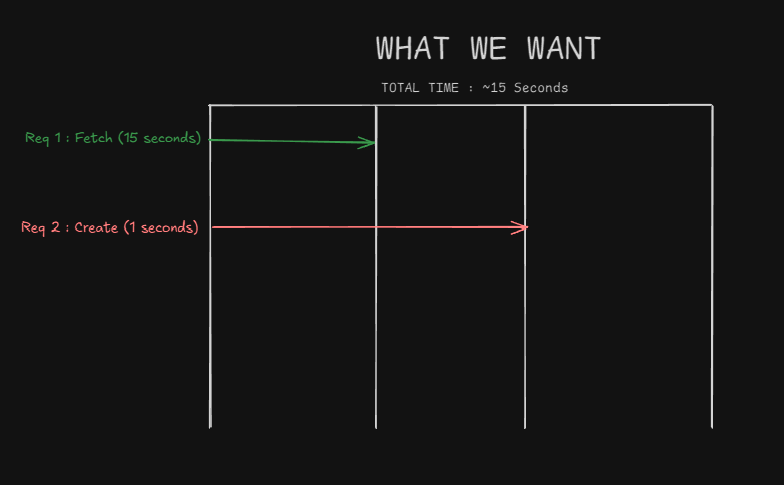
The first step is moving data fetching to server components. Server components let you fetch data and render parts of your UI on the server, with optional caching and streaming.
Example :
// page.tsx (Server Component)
import { Suspense } from 'react'
import TodoForm from './components/todo-form'
import TodoList from './components/todo-list'

export default function Home() {
  return (
    <div>
      <TodoForm />
      <Suspense fallback={<div>Loading...</div>}>
        <TodoList />
      </Suspense>
    </div>
  )
}
// components/todo-form.tsx (Client Component)
'use client';
export default function TodoForm() {
// Form logic with client-side validation
// and server action for mutations
}// components/todo-list.tsx (Server Component)
import prisma from '@/lib/prisma'
async function getTodos() {
return await prisma.todo.findMany()
}
export default async function TodoList() {
const todos = await getTodos()
return (
<div>
{todos.map(todo => (
<div key={todo.id}>
<h3>{todo.title}</h3>
<p>{todo.content}</p>
</div>
))}
</div>
)
}This approach:
Now let's add authentication. A common mistake is verifying sessions only at the page level:
// page.tsx
export default async function Home() {
  const { getUser } = getServerSession()
  const user = await getUser()

  if (!user) {
    redirect('/api/auth/login')
  }

  return (
    // Component JSX
  )
}
This seems secure, but it creates a critical vulnerability.
What happens when you extract the TodoList component for reuse?
Suppose you created a /test route and imported the TodoList component and forgot to do validation there or If another developer creates a new route and imports your component:
// app/test/page.tsx
import TodoList from '@/components/todo-list'

export default function TestPage() {
  return <TodoList /> // No session verification!
}
Visiting /test in an incognito browser will display the todos without authentication.
The session check only exists at the page level, not where the data is actually fetched.
The Next.js documentation recommends creating a data access layer to centralize data requests and authorization logic.
Here's the implementation:
// app/data/user/require-user.ts
import { redirect } from 'next/navigation';
import { cache } from 'react';
import 'server-only';

export const requireUser = cache(async () => {
  const { getUser } = getServerSession();
  const user = await getUser();

  if (!user) {
    redirect('/api/auth/login');
  }

  return user;
});
// app/data/todo/get-todos.ts
import prisma from '@/lib/prisma';
import 'server-only';
import { requireUser } from '../user/require-user';
export async function getTodos() {
await requireUser(); // Verify session before fetching data
return await prisma.todo.findMany();
}\
// components/todo-list.tsx
import { getTodos } from '@/app/data/todo/get-todos'

export default async function TodoList() {
  const todos = await getTodos()

  return (
    <div>
      {todos.map(todo => (
        <div key={todo.id}>
          <h3>{todo.title}</h3>
          <p>{todo.content}</p>
        </div>
      ))}
    </div>
  )
}Single Source of Truth: All data-related code is centralized in one place, making updates and debugging easier.
Natural Security Checkpoint: Session verification happens where data is fetched, preventing accidental data leaks when components are reused.
Organized Structure: Create folders for different data types:
app/data/
├── user/
│   ├── require-user.ts
│   ├── get-user.ts
│   └── get-all-users.ts
└── todo/
    ├── get-todos.ts
    ├── get-todo.ts
└── get-admin-todos.tsNotice the cache() function wrapping our requireUser function.
This is crucial for performance.
Imagine a dashboard that needs multiple data sources:
Without caching, requireUser() would run 10 times for a single page render. With React's cache() function, it runs once and caches the result for that render pass.
The cache is scoped to a single server-side render and doesn't persist between page navigations, making it perfect for this use case.
Add the server-only package to prevent accidental client-side usage:
import 'server-only';

// This import ensures the function only runs on the server
// and throws a build-time error if imported in client components
This is different from the 'use server' directive:
'use server': Creates server actions callable from both server and client'server-only': Ensures code only executes on the server, throws errors otherwiseThanks for reading ! Follow me on x its @ramxcodes