

DevelopmentNext.Js
Routing in Next.js (App Router) - A Complete Guide (2025)
A guide to routing in Next.js (App Router) covering Catch-All Segments, Dynamic Routes, Nested Routes, and more.
A guide to routing in Next.js (App Router) covering Catch-All Segments, Dynamic Routes, Nested Routes, and more.
Join the conversation by signing in with your Google account

A guide to Next.js data fetching mistakes & security vulnerabilities

A guide to JavaScript for frontend development for beginners part 1
Design & Developed by Ramxcodes
© 2026. All rights reserved.
Next.js has a file-system-based routing system. The URLs you can access in your browser are determined by how you organize your files and folders within your project.
src/app DirectoryIn Next.js (when using the App Router), the src/app directory serves as the foundation for your application's structure. Key files inside this directory include:
layout.tsx – Defines the layout for your application, allowing you to persist UI elements across different pages.page.tsx – Represents the content of a particular route.Suppose you want to have a homepage accessible at:
http://localhost:3000/
To achieve this, ensure that a page.tsx file exists inside the src/app directory. By default, this file is created when you initialize a Next.js project.
Now, let's say you want to create additional pages with different URLs.
To create a page accessible at:
http://localhost:3000/about
Follow these steps:
src/app directory, create a new folder named about.about, create a page.tsx file.export default function About() {
return <h1>Hello from About</h1>;
}If you want a page accessible at:
http://localhost:3000/ramx
Follow the same steps as above:
src/app, create a folder named ramx.ramx, create a page.tsx file.export default function Ramx() {
return <h1>Hello from Ramx</h1>;
}After adding these pages, your src/app directory will look like this:
src/app/
   layout.tsx  - Defines layout structure
   page.tsx  - Homepage
   about/
      page.tsx  - About Page
   ramx/
page.tsx - Ramx PageSuppose you want to handle the following routes:
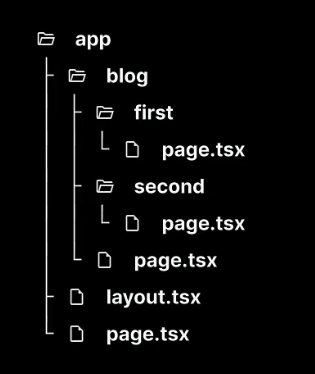
http://localhost:3000/bloghttp://localhost:3000/blog/firsthttp://localhost:3000/blog/secondblog folder inside src/app.blog, create a page.tsx file.This will create the route:
http://localhost:3000/blog
/blog/first and /blog/secondBrute force method (Good for small projects, but not recommended for scalability):
Manually create separate folders:
src/app/blog/first/page.tsx
src/app/blog/second/page.tsx
Each file should contain:
export default function FirstBlog() {
  return <h1>First Blog Post</h1>;
}
export default function SecondBlog() {
return <h1>Second Blog Post</h1>;
}
Suppose you want to create a product listing page where:
/products lists all products./products/product-1, /products/product-2, etc.Each product also has a details page, such as /products/1.
Manually create:
src/app/products/product-1/page.tsx
src/app/products/product-2/page.tsx
src/app/products/product-3/page.tsxInstead of manually creating pages for each product, use dynamic routing.
[productId] inside src/app/products/.[productId], create a page.tsx file.Your folder structure should look like:
src/app/products/
   page.tsx   # Product listing page
   [productId]/
page.tsx # Dynamic product pageexport default function ProductPage({
params,
}: {
params: { productId: string };
}) {
return <h1>Product ID: {params.productId}</h1>;
}Now, if you visit http://localhost:3000/products/100, the params.productId will be 100, and it will render dynamically.
Let's say you need URLs like:
http://localhost:3000/categories/electronicshttp://localhost:3000/categories/fashionhttp://localhost:3000/categories/electronics/phoneshttp://localhost:3000/categories/fashion/shoescategories folder inside src/app.categories, create a dynamic [categoryId] folder.[categoryId], create a dynamic [subCategoryId] folder.page.tsx inside both folders.src/app/categories/
[categoryId]/
page.tsx # Category page
[subCategoryId]/
page.tsx # Sub-category pageexport default function CategoryPage({
params,
}: {
params: { categoryId: string };
}) {
return <h1>Category: {params.categoryId}</h1>;
}export default function SubCategoryPage({
params,
}: {
params: { categoryId: string; subCategoryId: string };
}) {
return (
<h1>
{params.subCategoryId} in {params.categoryId}
</h1>
);
}If you need to handle any level of nested paths, use a catch-all segment.
http://localhost:3000/docshttp://localhost:3000/docs/getting-startedhttp://localhost:3000/docs/api/referencesrc/app, create a docs folder.docs, create a [...slug] folder (the three dots indicate "catch-all").[...slug], create page.tsx.src/app/docs/
[...slug]/
page.tsxexport default function DocsPage({ params }: { params: { slug?: string[] } }) {
return (
<div>
<h1>Docs Page</h1>
<p>Path: {params.slug ? params.slug.join(' / ') : 'Home'}</p>
</div>
);
}