

FrontendNext.JsJavaScriptDevelopment
How to optimise a Next.js web app
Optimise your Next.js web app to make it lightning fast!
Optimise your Next.js web app to make it lightning fast!
Join the conversation by signing in with your Google account

A guide to Next.js data fetching mistakes & security vulnerabilities

A guide to JavaScript for frontend development for beginners part 1

A guide to routing in Next.js (App Router) covering Catch-All Segments, Dynamic Routes, Nested Routes, and more.
Design & Developed by Ramxcodes
© 2026. All rights reserved.
So in this blog, I’m going to talk about React's and Next. Js best practices. This blog will contain landing page and functional both types of optimisations.
Let’s get started, but before, let me mention common terms that will be used in this blog.
Google uses metrics (web vitals) to rank a website on search pages. You can use tools like pagespeed analytics tool to check the current score of the website/web page.
Below is a reference
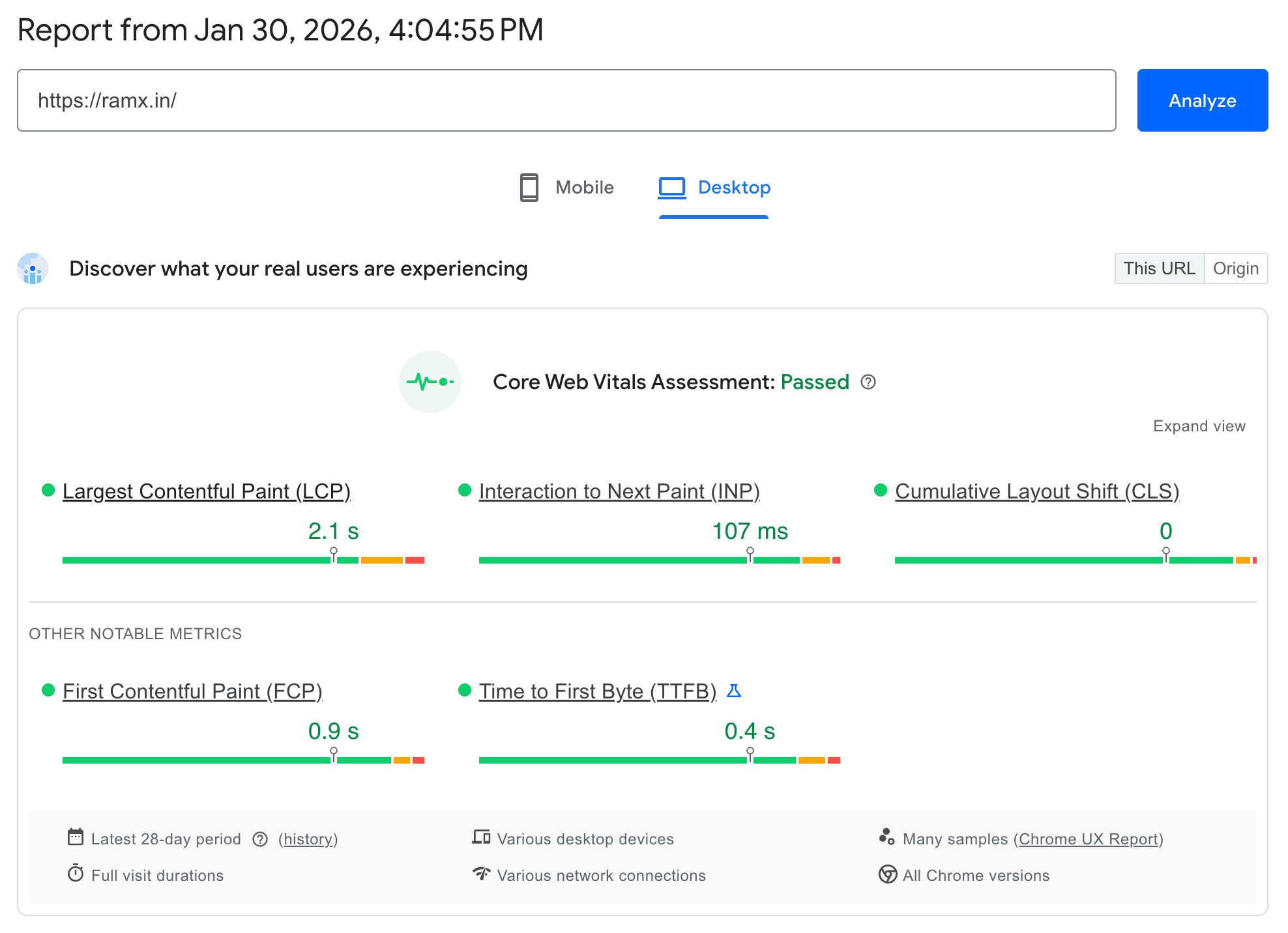
PageSpeed Analytics of ramx.in
If everything is under the green area. No improvement is needed Web Vital-wise, but it doesn't mean you should stop reading this blog right now, as there are a lot of tips that might help you optimise the performance of your app.
A bundle is a JavaScript file that we send to the user’s browser to execute the logical or UI part of a frontend application. Ideally, the bundle size should be ~500 KB, but in most cases, or due to UI libraries or different dependencies, the bundle size tends to increase. Make sure it’s not exceeding 1500 KB keep it under that.
How you will do that?
First, you need to check what the current bundle size of the page is. If you are on Next.Js 16 or above, then there is a CLI command available to analyse it.
npx next experimental-analyzeRefer this Doc
It will look something like this 👇
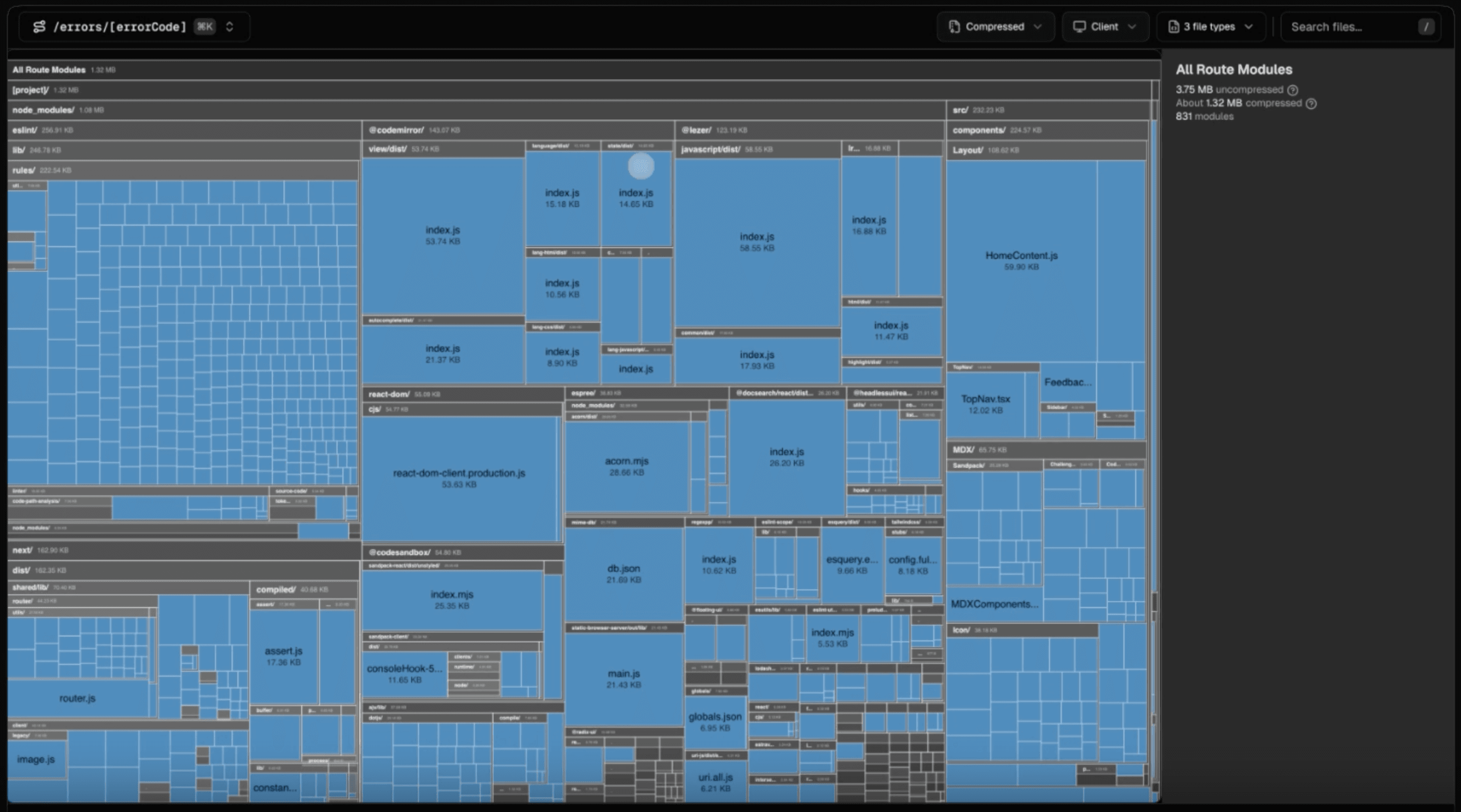
Bundle Size Analysis using Next.Js CLI
You can use external packages for React, Next.Js to get the approx bundle size.
To reduce bundle size
Find and eliminate unused library import.
Remove external libraries as much as possible
If you are using a library for something that can be replaced with one or two functions, replace the library with your own implementation. For example you are using react-video library for Resolution setting in the video you could just remove the library with a simple function.
The library increasing bundle size ~300 kb that can be reduced + your own implementation will take less of bundle size.
There are a lot of packages / libraries that does Barrel export. Mean a single file like index.ts have all the exports.
export * from "./LoaderIcon.tsx"
export * from "./Moon.tsx"
export * from "./Sun.tsx"
So when you import anything from the index.ts file it import the whole file.
import { LoaderIcon } from '@lucide/react' (size: ~2MB (potentially))Now someone who read webpack or turbopack implementation knows that barrel imports get optimized. Which is correct but not in case of when you are importing from node_modules web/turbo pack ignore barrel imports if they are from node_modules.
So instead of importing like above pattern use below pattern.
import LoaderIcon from '@lucide/react/disk/icon/LoaderIcon.tsx'This will insure you are importing only what is needed.
You can also add the following thing in your next.config.ts Official Doc
module.exports = {
  experimental: {
    optimizePackageImports: ['package-name'],
  },
}
By doing this nextjs will automatically going to optimise the package for you.
To optimise First Contentful Paint (FCP) in Next. Js, you should focus on delivering the critical content as quickly as possible by prioritising resources above the fold and reducing render-blocking assets.
<Image> Component: Replace standard <img> tags with the Next.js Image component. This component automatically optimizes images, uses modern formats like WebP, and implements lazy loading by default. But only if you are hosting on vercel or have setup own CDN server or using any CDN server so make sure that you have CDN in place.Use the priority property for LCP image: Apply the priority prop to the image that appears in the initial viewport (the LCP element). This disables lazy loading for that specific image and adds a preload link in the HTML head, ensuring it's fetched as early as possible.
Avoid lazy loading in-viewport images: Do not use loading="lazy" or other JavaScript-based lazy loading solutions for images that are "above the fold". This delays the image's loading until the JavaScript is executed, increasing LCP.
Use LQIP to increase the percieved speed: LQIP (Low quality image placeholders) increase the perceived speed watch the following video to understand the concept of it. Video Link
next/font automatically optimizes your fonts (including custom fonts) and removes external network requests for improved privacy and performance.Defer or async 3rd party services: Load other scripts like Tracking services (PostHog, umami, GTAG) after the page delivery. Do not try to load everything all together in content delivery you can use next/dynamic to load them after hydration is done.Next.js supports multiple rendering strategies. Choosing the correct strategy has a direct impact on Web Vitals, especially FCP, LCP, and TTFB (Time To Firsts Byte).
In SSG, HTML is generated at build time and served via CDN.
When to use:
Why it helps performance: Because of No server computation at request time, Since its serving via CDN so its have Extremely low TTFB and Best possible FCP and LCP
ISR allows you to regenerate static pages at a fixed interval.
export const revalidate = 60
When to use:
Why it helps performance:
SSR generates HTML on every request.
When to use:
Trade-offs:
CSR renders content entirely in the browser. (This is what plain react it and we get in default Vite + React app)
When to use:
Downside:
React Server Components allow components to run only on the server and send rendered output to the client without shipping JavaScript.
By default, all components in the Next.js App Router are Server Components.
Only components marked with "use client" are sent to the browser. Avoid marking entire pages as client components.
Instead make a child component and make it client sided, This ensures only required JavaScript is shipped.
Next.js performs route-level code splitting automatically, but component-level splitting is still required for large client-side features.
Use dynamic imports when dealing with -
const Chart = dynamic( () =>
	import("./Chart"),
	{ ssr: false }
)
Do not use them when -
Excessive dynamic imports increase network requests and can cause loading waterfalls.
Check the below things before pushing your code to production:
Low Priority
Medium Priority
High Priority
Now I know there are a lot of topics and things that also help with optimisation, but I’m not covering them here as they are mostly about writing better code, e.g., Hydration, UseEffect, Animations, etc. We will cover those in the future or in a different blog.
I hope you liked the blog. You can comment down and add more things to it.
Also, do connect with me on my socials.